 BananaShot
Changelog
The changes in each version. The newest version is at the top.
1.5.0
A match from several video files
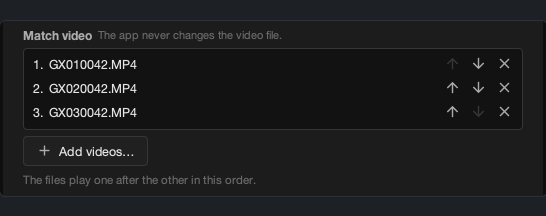
Action cameras and some phones split a long recording into several files. Now one project can use all of them. In New project, select all files of the match, or click Add videos… to add files from other folders. You can move a file up or down in the list. The app plays and exports the files as one video. The points timeline shows where each file starts.
Export preview
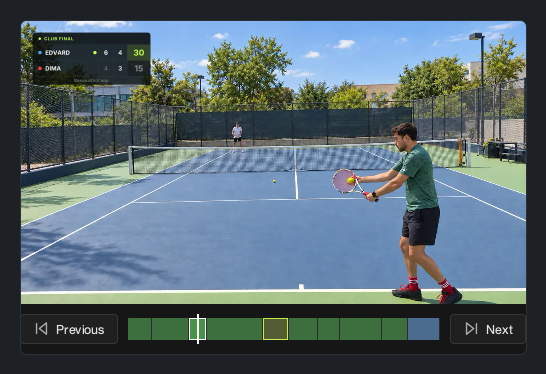
In the Export tab, click Preview to play the result before the export starts. You can see the points, the scoreboard, the comments, the replays, and the cards. Thus you can find a problem before a long export.
Other changes
- Statistics: the new row "Tiebreaks won".
- Statistics: "Deuce games won" replaces "Deuce points won". The rows "Most points in a row", "Most games in a row", and "Largest point lead" are removed. The momentum chart stays.
- The still frame of a replay stays on the same frame in the preview and in the export.
1.4.1
Styles for the statistics card
In the Statistics tab, use Card style to select the look of the statistics card: Classic, Mirror, Stripes, Labels, or Sheet. Each style works with these options:
- Compact card shows more rows on each page.
- Group titles shows the title of each group above its rows.
- Light card shows dark text on a light card.
Simple thumbnail styles
The Thumbnail tab has the new group Simple with 5 styles: Score box, Underlined, Serif, Headline, and Labels. There is also the new color set Graphite.
Other changes
- Comments: the new styles Plain, Shadow, and Bold.
- The computer does not go to sleep while an export runs. The display can still turn off. To turn this off, go to More → Settings → Export.
- After a crash, the next start shows a popup. Report this problem opens the report form with the details of the crash. The form shows all data before you send it.
- The points list is narrower, so the video is larger. The Edit and Delete buttons show when you move the pointer over a row. To open the replay editor, use Replay in the playback bar.
- In the Points tab, the playhead stays in the trimmed part of the video.
- The Statistics tab and the statistics card no longer show the average time between points.
- The dialogs fit on small screens, so their buttons stay visible.
- A click on a project row or on a color square no longer gets lost when the pointer moves a little.
- The keys of the Points tab work at once after the Edit dialog closes.
- Mac: the app does not crash at sleep with an open video. In full screen, the video stays in its place, and you can drag a comment by its text.
1.4.0
BananaShot is now also on Mac
BananaShot now works on Macs with Apple Silicon (M1 or later) and macOS 15 or later. It is the same app, with all features of the Windows version. It is free on Mac too. The export uses the video encoder of the Mac (VideoToolbox). Download for Mac
Select when the scoreboard shows
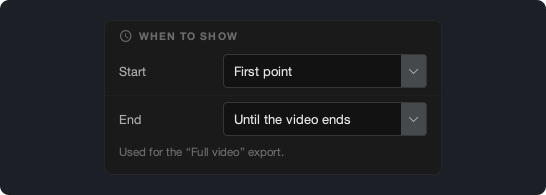
In Scoreboard settings → When to show, you can select when the scoreboard starts and ends in the "Full video" export:
- Start: First point (the default), Video start, or Fixed time.
- End: Right after the last point, 5, 10, or 20 s after the last point (the default), Until the video ends, or Fixed time.
- Fixed time: type the time (hh:mm:ss), or click Use the current position. A fixed time belongs to the video of the project, so a new project does not get it.
- The "Only points" and "Only favorites" exports do not use these settings.
Select the font of the scoreboard
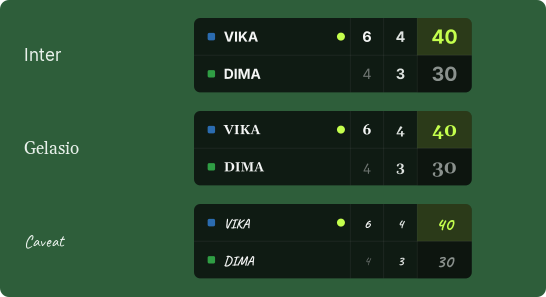
In Scoreboard settings → Font, you can select the font of the scoreboard from the list. Font of the style keeps the fonts of the scoreboard style.
The scoreboards, the statistics card, and the comments now use fonts that come with the app, so an export looks the same on each computer. A new export of a project from an earlier version can look a little different.
Statistics
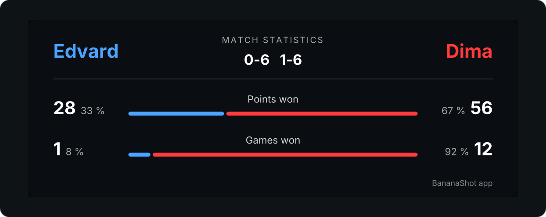
- Games won, Sets won, and Most games in a row come from the score. A game that you type with Override score now counts, also when no marked point wins it.
- When the score has overrides, the Stats tab shows a note, because some statistics can then be wrong.
Trim
The Trim sub-tab has an improved design.
Other changes
- The app asks before it deletes a point: with the Delete key, with the Delete button of a row, and in the Edit dialog.
- Esc cancels the pending point. A change of the project also cancels it.
- Each point ends with its winner, so the "not scored" state and the V key are gone. The Projects tab shows a "Points" column.
- An export cannot replace the source video. The Export tab then asks for another file.
- A "Full video" export with a statistics card now also works when the audio of the video file is longer than the video. Many phones and cameras make such files.
- If you disconnect a second screen, the app now opens on your main screen.
1.3.1
- Trim: a new Trim sub-tab on Colors & Transform sets the start and the end of the video. The "Full video" export uses only this part. The app keeps the points outside the trim and shows them in red.
- Full-video export: the scoreboard starts at the first point and shows the final score for 20 seconds after the last point, as in the preview.
- Videos with non-square pixels (for example DV or HDV): the scoreboard, the comments, the replay badge, and the statistics card keep their shape.
1.3.0
- Languages: the app is now also in Spanish, Portuguese, French, German, Russian, Japanese, and Chinese (Simplified and Traditional). It uses the language of Windows, or you can select one in More → Settings. The texts in the video can use a different language: select it in Export → Video language.
- Instant replay: you can show a part of a point again right after the point, with a zoom and slow motion. A point can have more than one replay.
- Comments: you can drag a comment on the video, and change its size, opacity, and rotation.
- Thumbnail: 25 new styles in 5 groups. You can add your logo, the club name, the round, and the score.
- Beach tennis: a new sport with the ITF rules, a match tiebreak in place of the third set, and no-ad.
- Match end: after the match point, the scoreboard shows the final score of all sets, and the Points tab shows the match end. A new format "Sets, no match end" has no last set.
- "What's new": from now on, the app shows the main changes when a new version is out.
- Usage statistics also send the language of the app and of Windows. See the privacy notice.
1.2.0
- Points: you can mark the points and score them on one tab. The Scoring tab is gone. With "Override score", you can type the score after a point. "Frame step" moves the video one frame at a time.
- Colors & Transform: one tab for the colors and for the crop and rotation. If the light changes or the phone moves during the match, you can add a change point. The video blends to the new values in 1 second.
- Thumbnail: a new tab makes a YouTube thumbnail from a frame of a point, with large texts and the match data. You can select a style, change the colors, and zoom into the frame.
- Scoreboards: two new styles, Stadium and Stadium Compact.
1.1.0
- Padel: score padel matches with two teams. The deuce can be advantage, golden point, or star point. Americano matches count a fixed total of points. The scoreboard shows the teams, and the statistics use a padel court.
- Themes: you can select a dark, mid, or light theme and your own accent color in More → Settings.
- Projects: when the match video is moved or renamed, you can find it again with "Locate video..." and continue the project.
- Extended statistics (only if you turn them on) also send the theme, the language, and the sports of your projects. See the privacy notice.
1.0.0
The first public version.
- Projects: import a match video and continue later from the list of recent projects.
- Points: mark the start and the end of each point, mark favorites, and add comments to the video.
- Scoring: give each point to a player. The app counts the score for many match formats and shows the server.
- Statistics: serve, break points, point length, and a momentum chart. A statistics card and set summaries in the video.
- Colors and Transform: light and color controls, zoom, move, and rotate.
- Export: the full match, only the points, or only the favorites, with the scoreboard and the comments. Hardware encoders from NVIDIA, AMD, and Intel. An export queue.
- Feedback form in the app. Anonymous usage statistics: essential statistics on by default (you can turn them off), and extended statistics only if you turn them on.
- Update check and "Update and restart".